
Last week I showed yall how to set up Google Analytics. It takes less then 5 minutes to set up and is one of the most beneficial things you can do for your blog. It gives you so much information that you can use to better your site. Today, Im going to go over what a few of the numbers mean, how to find your referring sites and your top keywords.
When you log in to your analytics you are taken to a front page that shows all your stats. All of these numbers tell you something different about your site.
- Visits: Number of times someone visits your site.
- Unique visitors: Number of times someone visits your site, but each IP address only counts as one visit. So I can visit your site 100 times but I will only count as one visit.
- Pageviews: Number of pages viewed per week/month. How many times do they click next page or go to another blog post.
- Pages/Visit: The average number of pages viewed per visit. Its good for this number to be high.
- Avg. Visit Duration: The average time that people are on your site per visit. Its good for this number to be high, it shows you have good content that keeps readers interested.
- Bounce Rate: The number of readers who read one post on your site and leave. Its good to have a low bounce rate.
- New Visits: New readers to your site.
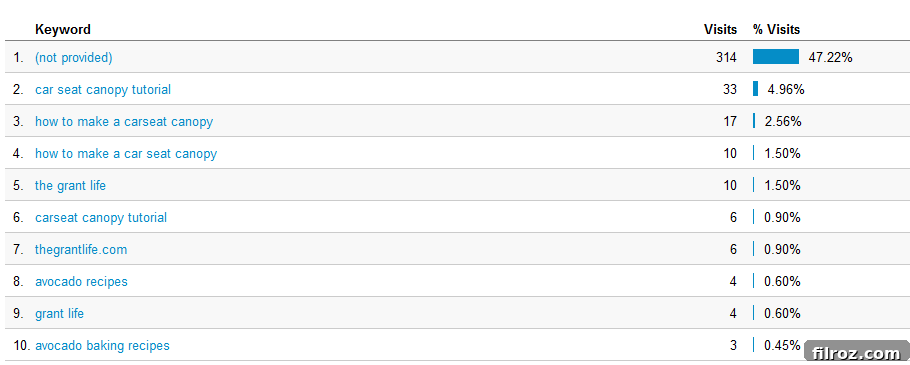
Go to the left site of your page and click on traffic sources>overview. This will bring up the top keywords that people use to find your site.
This is great information to use for future posts. A few of my top keywords are from the car seat canopy tutorial and the avocado posts I’ve shared. People are searching for these topics and ending up on my site, which is awesome! I may do more posts on both just to increase my rank on both subjects.
From the main page click on the traffic sources>sources>all traffic. This will show you all your referral sites.
As you can see Pinterest is my top referral, by a lot! The columns on the right show the average pages per visit, duration, percent new visits and bounce rate. Its nice to see your top referrals and use that information to make your site better. For instance, I need to find a way to lower my bounce rate and keep the Pinterest traffic on my site longer.
What is your favorite feature in Google Analytics?
Mastering Google Analytics: Unlocking Your Website’s Full Potential
In today’s digital landscape, understanding your website’s performance is paramount for sustained growth. Just last week, we guided you through the straightforward process of setting up Google Analytics – a task that typically takes less than five minutes but offers immeasurable benefits for any blog or website owner. This powerful tool serves as the compass for your online journey, providing a wealth of information crucial for making informed decisions and significantly enhancing your site’s effectiveness.
Google Analytics isn’t just about raw numbers; it’s about translating data into actionable insights. It empowers you to understand who your audience is, how they interact with your content, where they come from, and what keeps them engaged (or drives them away). Today, we’re taking the next crucial step: demystifying these numbers. We’ll explore the meaning behind key metrics, walk you through the process of identifying your most valuable referring sites, and uncover the top keywords that are bringing visitors to your digital doorstep. By the end of this guide, you’ll be equipped to not just view your analytics, but to truly interpret and leverage them for strategic website optimization.
Demystifying Your Google Analytics Dashboard: Core Metrics Explained
Upon logging into your Google Analytics account, you’re greeted by a dynamic dashboard showcasing a comprehensive overview of your site’s performance. Each statistic presented here tells a unique story about your audience’s behavior and your content’s impact. Understanding these fundamental metrics is the first step toward effective website management and strategic improvement.
- Visits (Sessions): This metric represents the total number of times users interact with your website. A “visit” or “session” begins when a user lands on your site and typically ends after a period of inactivity (usually 30 minutes) or when they leave. A high number of visits indicates consistent traffic generation, which is a positive sign for your site’s visibility and appeal. Understanding sessions helps gauge how often your site is accessed.
- Unique Visitors (Users): While “visits” count every interaction, “unique visitors” (now commonly referred to as “Users” in modern analytics platforms like GA4) count individual users. So, if the same person visits your site multiple times within a specified period, they are counted as multiple visits but only one unique visitor. This metric provides a clearer picture of your actual audience size, distinguishing between repeat engagement and new user acquisition, which is vital for audience growth strategies.
- Pageviews: Pageviews track the total number of pages viewed across your website during the reporting period. This includes repeat views of the same page by the same user. A high pageview count suggests that visitors are exploring your content deeply, clicking through different articles, or navigating various sections of your site. It’s an excellent indicator of content breadth, internal linking effectiveness, and the overall engagement potential of your site’s structure.
- Pages/Visit (Pages per Session): This average metric calculates how many pages a user views, on average, during a single visit to your site. A higher “Pages/Visit” number is generally desirable as it signifies greater user engagement and interest in your content. It suggests that your website successfully guides visitors to explore more, perhaps through compelling internal links, related content suggestions, or intuitive navigation. Strategies to increase this include improving content quality, optimizing internal linking, and creating clear calls to action within your content.
- Avg. Visit Duration (Average Session Duration): This metric measures the average amount of time users spend on your site per visit. A longer average visit duration is a strong positive indicator, suggesting that your content is valuable, engaging, and successfully holding your readers’ attention. It implies that visitors are taking the time to read, watch, or interact with your material, which often correlates with higher content quality and better user experience. Aim to create compelling, in-depth content that encourages extended stays.
- Bounce Rate: Bounce rate is defined as the percentage of single-page sessions on your site. In simpler terms, it’s the percentage of visitors who land on one page of your site and leave without interacting with any other pages. A low bounce rate is generally preferred, as it indicates that visitors are finding your content relevant and are encouraged to explore further. High bounce rates can signal issues with content relevance, user experience, mobile responsiveness, slow loading times, or misleading calls to action.
- New Visits (New Users): This metric highlights the percentage of first-time visitors to your website during the selected period. A healthy stream of new visits is crucial for expanding your audience reach and discovering new potential customers or readers. While attracting new users is vital, it’s equally important to convert them into returning visitors through compelling content and a positive user experience, thereby building a loyal audience base.
Understanding the Interplay of Metrics for Deeper Insights
While each metric offers standalone value, their true power emerges when analyzed collectively. For instance, a high number of visits coupled with a low average visit duration and a high bounce rate might suggest that while your site attracts traffic, it struggles to retain it or engage users effectively. Conversely, a modest number of unique visitors but a high “Pages/Visit” and “Average Session Duration” indicates a highly engaged, loyal audience. Regularly reviewing these metrics together provides a holistic view of your website’s performance and helps pinpoint areas for improvement, guiding your optimization efforts.
Uncovering Your Audience’s Intent: Top Keywords and SEO Strategy
Keywords are the bridge between your audience’s questions and your content’s answers. Understanding which search terms bring visitors to your site is invaluable for refining your content strategy and boosting your search engine optimization (SEO) efforts. While Google Analytics provides some keyword data, for a more comprehensive understanding, combining it with Google Search Console is highly recommended (as direct keyword data has become limited in GA over time).
How to Access Keyword Data in Google Analytics:
To find the keywords users are employing to discover your site, navigate to the left-hand side menu of your Google Analytics dashboard. Click on Traffic Sources > Overview. This section will typically present a snapshot of your traffic acquisition channels, including some top keywords if available. For more detailed keyword reports, especially integrated with Google Search Console, you might need to explore Acquisition > Search Console > Queries (after linking your GSC account). This integration offers a deeper look into the exact search terms driving organic traffic and how your site performs for them.
Leveraging Keyword Insights for Content Creation:
This keyword data is gold for future content planning and existing content optimization. For example, the original blog found that terms related to its car seat canopy tutorial and various avocado posts were top performers. This insight is incredibly powerful: if people are actively searching for these topics and landing on your site, it indicates a strong demand for that information and a clear opportunity for growth.
Actionable steps you can take to leverage keyword data:
- Create More Related Content: Identify your top-performing keywords and consider developing more in-depth articles, tutorials, or supplementary content around those themes. This can help establish your site as an authority in those niches, attracting more organic traffic.
- Optimize Existing Content: Review pages that are already ranking for key terms. Can they be updated, expanded, or made more comprehensive to better serve user intent? Ensure your meta descriptions and titles are compelling and optimized for these keywords to improve click-through rates from search results.
- Discover Long-Tail Opportunities: Pay attention to longer, more specific keyword phrases. These often indicate high user intent and can be easier to rank for than broad, competitive terms. Targeting long-tail keywords can bring highly qualified traffic to your site.
- Address Content Gaps: If you notice popular search terms for which you don’t yet have content, it’s a clear signal to fill that gap. This proactive approach ensures you’re continually meeting the search demands of your target audience.
By strategically using keyword data, you can not only increase your search engine ranking but also ensure your content directly addresses the needs and questions of your target audience, leading to higher engagement, better user experience, and ultimately, greater website success.
Identifying Your Most Valuable Referrers: Optimizing Referral Traffic
Understanding where your visitors come from – your referral sources – is fundamental to optimizing your marketing efforts and expanding your online reach. Referral traffic represents visitors who arrive at your site by clicking a link on another website, such as social media platforms, other blogs, forums, or directories. This data helps you identify which external sources are most effective in driving traffic and, more importantly, engaged users to your site, allowing for targeted outreach and promotional strategies.
How to Locate Your Referral Sources:
From the main Google Analytics dashboard, navigate to the left-hand menu. Click on Traffic Sources > Sources > All Traffic. This path will reveal a comprehensive list of all the websites that have sent traffic to your site. You can then filter this data to specifically view “Referral” traffic, giving you a clear breakdown of external sites and their performance metrics.
Analyzing Referral Source Performance:
The referral report isn’t just a list of names; it’s a treasure trove of performance data. Alongside each referring site, you’ll typically find metrics such as:
- Average Pages per Visit: How many pages do visitors from this source view on average during their session? This indicates content stickiness.
- Average Visit Duration: How long do they stay on your site? A longer duration often signifies higher engagement and content value.
- Percent New Visits: What percentage of traffic from this source is new to your site? This helps assess the source’s ability to introduce new audiences.
- Bounce Rate: How often do visitors from this source leave after viewing only one page? A low bounce rate suggests high relevance and engagement.
As the original example highlighted, discovering that Pinterest was a top referrer by a significant margin is a powerful insight. Such data allows you to focus your efforts where they matter most. If a platform like Pinterest sends a lot of traffic, it suggests that your content (or its visual presentation) resonates well there. However, if that traffic also has a high bounce rate or low average duration, it indicates a disconnect – perhaps the initial expectation set by the referrer isn’t met on your site, or the content isn’t compelling enough to encourage further exploration. This calls for optimizing the landing page experience or the content promoted on Pinterest.
Actionable Strategies for Referral Traffic Optimization:
- Double Down on High-Performing Referrers: If a social media platform, another blog, or a directory sends high-quality, engaged traffic, invest more time and resources into that channel. For Pinterest, this might mean creating more visually appealing pins, optimizing pin descriptions with relevant keywords, and ensuring your landing pages are highly relevant to the pin’s content.
- Address Underperforming Referrers: For sources sending traffic with high bounce rates or low engagement, analyze why. Is the content linked poorly? Is the expectation set by the referrer misleading? You might need to adjust your strategy on that external platform or improve the landing page experience on your site.
- Cultivate Relationships: Identify key blogs, industry websites, or online communities that refer valuable traffic. Engaging with these sites (e.g., guest posting, thoughtful commenting, collaborative content) can strengthen the referral link and potentially increase both traffic volume and quality.
- Diversify Your Sources: While focusing on top referrers is smart, also look for opportunities to gain referrals from new, relevant sources to broaden your audience and reduce reliance on a single channel. This builds resilience in your traffic acquisition strategy.
By actively analyzing and acting upon your referral traffic data, you can strategically nurture your most valuable external relationships and continually refine your approach to attract and retain an engaged audience, ultimately driving sustainable growth for your website.
Beyond the Numbers: Turning Analytics into Actionable Growth
The true value of Google Analytics lies not just in observing data, but in transforming those observations into tangible improvements for your website. Think of your analytics dashboard as a sophisticated feedback loop, constantly providing information that allows you to refine your content, enhance user experience, and optimize your marketing strategies with precision.
Regularly reviewing your metrics allows you to:
- Identify Trends: Spot seasonal fluctuations in traffic or content popularity, observe the immediate and long-term impact of new content or marketing campaigns, and understand overarching growth patterns.
- Pinpoint Weaknesses: High bounce rates on specific pages? Low average duration from a particular traffic source? These are clear signals indicating areas that need immediate attention and improvement, helping you prioritize your optimization efforts.
- Capitalize on Strengths: What content resonates most deeply with your audience? Which channels bring the most engaged users? Replicate these successes, build upon them, and allocate resources more effectively to maximize your impact.
- Make Data-Driven Decisions: Instead of guessing what your audience wants or what might improve your site, use actual behavioral data to guide your content creation, website design changes, promotional activities, and SEO adjustments.
Consider conducting A/B tests based on your analytics insights. For example, if a specific call-to-action on a landing page has a high exit rate, try different wording, placement, or design elements and rigorously measure the impact with analytics. This iterative process of analyzing, hypothesizing, implementing, and re-analyzing is the core of effective website optimization and continuous improvement.
Conclusion: Empowering Your Website with Google Analytics
Google Analytics is more than just a reporting tool; it’s an indispensable asset for any website owner committed to understanding and improving their online presence. From deciphering core user behavior metrics like visits and pageviews to strategically leveraging insights from top keywords and referring sites, the data available empowers you to make smarter, more impactful decisions that drive real results.
By regularly delving into your analytics, you transform raw data into a powerful narrative of your website’s journey and your audience’s interaction. This ongoing process of learning, adaptation, and data-backed decision-making is what fosters sustainable growth, cultivates a loyal audience, and ultimately maximizes your digital potential. Don’t let your analytics sit idle; dive into your dashboard, explore the fascinating world of your website’s data, and start making those informed choices that will propel your online success.
What insights have you uncovered from your Google Analytics data recently? What is your favorite feature or the most surprising discovery you’ve made that helped shape your content or marketing strategy?