Mastering Your Blog: The Essential Guide to Scheduling Posts for Peak Performance
Blogging, while incredibly rewarding, can often feel like a relentless marathon. The constant demand for fresh content, coupled with the myriad of other tasks that come with managing a blog – from promotion to community engagement – can quickly lead to overwhelm and, ultimately, burnout. Trust me, many seasoned bloggers have faced this wall. But what if there was a simple, yet profoundly effective strategy to transform this chaotic cycle into a smooth, manageable, and even enjoyable process? The secret lies in a powerful technique that can revolutionize your blogging workflow: scheduling your posts ahead of time. This comprehensive guide will not only illuminate the immense benefits of post scheduling but also provide you with step-by-step instructions for implementing it across popular platforms like Blogger and WordPress, ensuring your blog thrives without consuming your life.
Why Scheduling Your Blog Posts is a Non-Negotiable Strategy for Every Blogger
The idea of scheduling content might seem like an extra step, but its long-term benefits far outweigh the initial effort. Consider these compelling reasons why integrating post scheduling into your routine is not just a good idea, but an essential one for sustainable blogging success.
1. Combatting Burnout and Maintaining Consistency
The number one killer of blogs is inconsistency, often stemming from blogger burnout. Imagine the pressure of waking up every day knowing you have to write, edit, and publish a new post, all while juggling daily life. This pressure cooker environment is unsustainable. By dedicating a specific block of time each week or month to batch create and schedule your content, you eliminate this daily stress. You’re no longer scrambling for ideas or rushing to meet a deadline. Instead, you’re building a content buffer, ensuring your blog consistently delivers fresh material to your audience, even when life throws unexpected curveballs. This predictability is not only good for your mental health but also signals reliability to your readers and search engines.
2. Unleashing Productivity and Optimizing Time Management
For many, blogging is not a full-time job. With commitments like family, work, and personal life, finding uninterrupted time to write can be a luxury. I, for instance, cannot be tethered to a computer all day with two toddlers demanding my attention. Scheduling posts allows me to dedicate one evening a week to this task. This focused approach to content creation is a powerful productivity hack. Instead of context-switching between different tasks daily, you can get into a “writing zone” and produce multiple pieces of content more efficiently. This batch processing dramatically reduces the mental fatigue associated with starting and stopping creative work, allowing you to get more done in less time.
3. Conquering Writer’s Block with a Clear Mind
Writer’s block is a common nemesis for bloggers. However, when your immediate content pipeline is secure, your mind is freed from the urgent need to come up with the next post. If I have posts scheduled a week or even two in advance (a rare, but blissful, occasion!), my creative energy can be directed towards brainstorming truly innovative and engaging new content ideas. I use an editorial calendar religiously, adding every nascent idea as it strikes. This allows me to think proactively about upcoming holidays, seasonal trends, relevant industry events, or niche topics I want to explore. When the pressure to publish is off, creativity flourishes, leading to more thoughtful and higher-quality articles.
4. Elevating Content Quality and Strategic Planning
When you’re not rushing to publish, you have the luxury of time to refine your content. This means more thorough research, clearer articulation of ideas, meticulous editing, and optimization for search engines. Scheduling empowers you to step back, review your work with fresh eyes, and ensure every post meets your quality standards. Furthermore, it integrates seamlessly with a broader content strategy. You can plan thematic weeks, series of posts, or launch campaigns with precision, ensuring a cohesive and impactful content delivery that resonates deeply with your target audience. This foresight is crucial for building authority and engagement.
5. Enhancing Search Engine Optimization (SEO)
Search engines, particularly Google, favor websites that consistently publish fresh, high-quality content. A regular posting schedule, made possible by content scheduling, signals to search engine algorithms that your site is active and relevant. This consistent activity can positively impact your search rankings over time. Moreover, by scheduling, you have the opportunity to strategically plan keyword integration, optimize meta descriptions, and craft compelling titles for each post, all of which are vital components of effective SEO.
How to Schedule Your Blog Posts: A Step-by-Step Guide
Now that you understand the transformative power of post scheduling, let’s dive into the practical steps for implementing this strategy on two of the most popular blogging platforms: Blogger and WordPress.
Scheduling Posts in Blogger
Blogger, known for its user-friendliness, makes scheduling incredibly straightforward. Here’s how you can prepare your posts to go live at a future date and time:
- Create Your Post: First, compose your blog post as you normally would. Add your title, body content, images, and any other elements.
- Navigate to Post Settings: On the right-hand sidebar of your post editor, locate the “Post settings” panel.
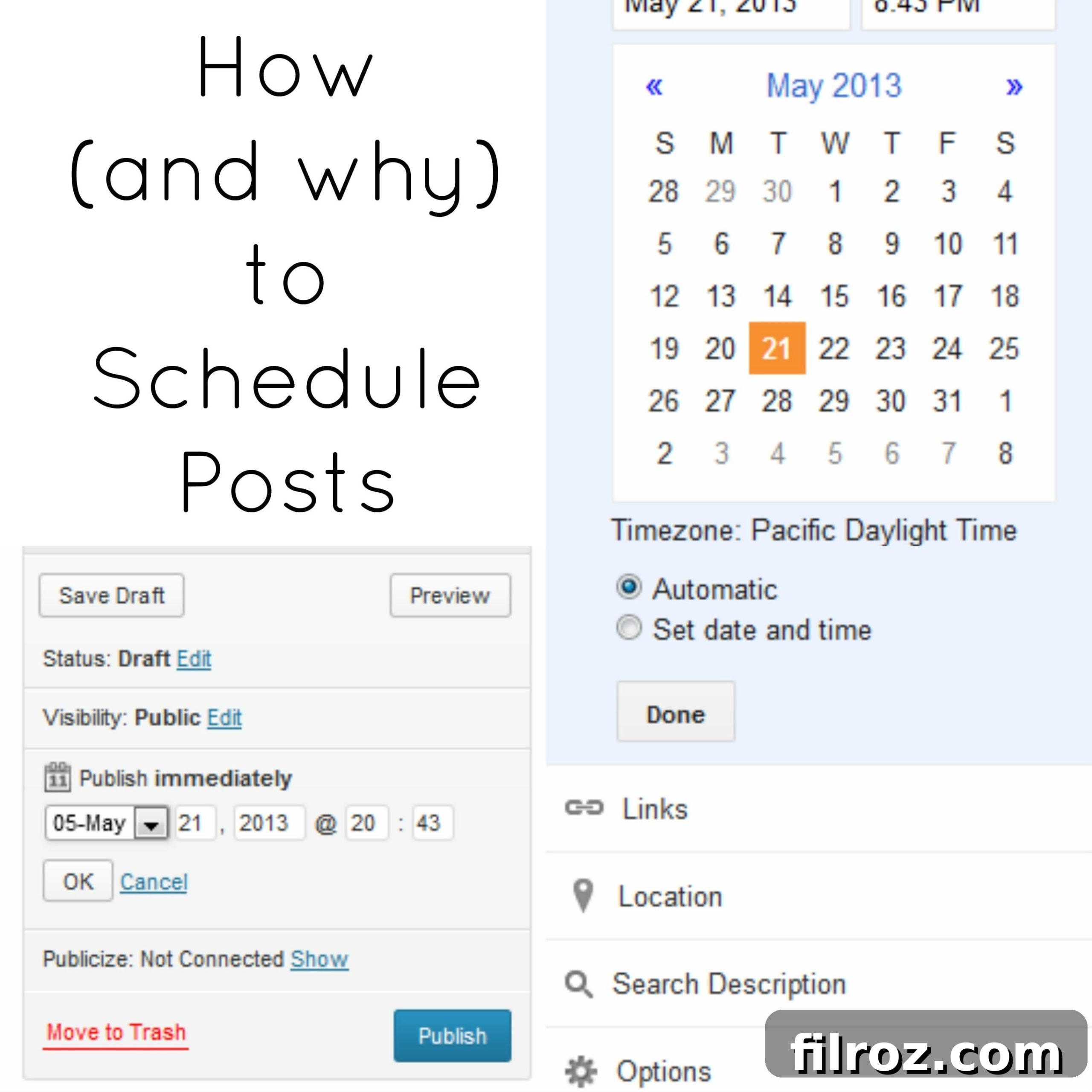
- Access the Schedule Option: Within the “Post settings,” you’ll find an option labeled “Schedule.” Click on it. By default, it might say “Automatic” (meaning it publishes immediately upon clicking “Publish”).
- Set Date and Time: Change “Automatic” to “Set date and time.” A calendar and time selector will appear.
- Pick Your Desired Publication Time: Select the specific date and time you want your post to be published. Remember that Blogger’s default time zone is Pacific Standard Time (PST). If you are in a different time zone, make sure to convert your desired publication time to PST accordingly to avoid any misalignments. This is a crucial step for ensuring your content goes live when your target audience is most active.
- Confirm and Save: After choosing your date and time, click “Done” or “Update” to save these settings.
- Publish (Schedule) Your Post: Finally, click the main “Publish” button for your post. Instead of publishing immediately, it will now be scheduled for your chosen date and time.
Always double-check your scheduled date and time before saving, especially concerning time zone conversions. A small oversight here can lead to your post appearing at an odd hour for your audience.
Scheduling Posts in WordPress
WordPress offers equally robust and user-friendly options for scheduling posts, whether you’re using the Classic Editor or the modern Gutenberg Block Editor. The core functionality remains the same.
Using the Classic Editor:
- Craft Your Content: Write your entire post in the WordPress Classic Editor.
- Locate the Publish Box: On the right-hand side of your editor screen, you’ll see the “Publish” meta box.
- Edit Publication Date: Next to “Publish immediately” (or “Published on: [date]”), you’ll find an “Edit” link. Click on this.
- Set Your Desired Date and Time: This will bring up a date and time picker. Input the exact year, month, day, hour, and minute you want your post to go live. WordPress automatically uses your site’s configured time zone, so there’s usually no manual conversion needed here, unlike Blogger.
- Confirm Your Selection: Hit “OK” once you’ve set the desired date and time.
- Schedule the Post: The “Publish” button will now change to “Schedule.” Click this button to queue your post for publication at the chosen time.
Using the Gutenberg Block Editor (Current Standard):
- Compose Your Post: Write your blog post using the various blocks in the Gutenberg editor.
- Open Post Settings: On the top right of the editor, click the “Settings” cog icon if the sidebar isn’t already open. Ensure you are on the “Post” tab, not the “Block” tab.
- Find the “Publish” Panel: Scroll down in the “Post” settings sidebar until you see the “Publish” panel.
- Access Date & Time: Under “Summary” (or similar), you’ll see “Publish” with a date and time next to it. Click on the immediate date/time link.
- Select Future Date and Time: A calendar and time input will appear. Choose your desired publication date and time. Again, WordPress respects your site’s time zone settings.
- Confirm and Schedule: Once your date and time are set, close the calendar. The button at the top right, previously “Publish,” will now display as “Schedule.” Click “Schedule,” then confirm one more time in the pop-up window.
Regardless of the editor, WordPress scheduling is robust. You can also easily edit a scheduled post before its publication date if you need to make last-minute changes or even reschedule it for a different time.
Maximizing Your Scheduling Strategy: Advanced Tips for Bloggers
Once you’ve mastered the basics of scheduling, consider these advanced tips to further optimize your workflow and content strategy:
Develop a Comprehensive Editorial Calendar
Don’t just schedule individual posts; plan your content weeks or even months in advance using an editorial calendar. This calendar can be a simple spreadsheet, a Google Calendar, or a dedicated content planning tool. Include details like post topics, target keywords, target audience, call to action, planned publication date, and status (draft, edited, scheduled, published). A well-structured calendar ensures a diverse content mix, helps you hit seasonal trends, and allows for strategic internal linking between upcoming posts.
Batch Content Creation
Instead of writing one post, scheduling it, and then repeating the process, try batching. Dedicate a specific day or block of hours to brainstorming ideas, another to writing multiple drafts, another to editing and image creation, and finally, a session for scheduling all the prepared content. This method leverages your focus and reduces the overhead of context-switching, making you significantly more efficient.
Review and Adapt Regularly
While scheduling provides structure, it should not be rigid. Regularly review your analytics to understand when your audience is most active and engaged. Use this data to adjust your scheduling times for optimal reach. Also, be prepared to adapt your schedule for timely news or unexpected events that might warrant a spontaneous, unscheduled post. Flexibility within a structured system is key.
Image Optimization and Alt Text
As seen in the original HTML, images are a crucial part of blog posts. When scheduling, take the time to optimize your images. This includes compressing them for faster load times and, critically, adding descriptive alt text. Alt text not only improves accessibility for visually impaired readers but also provides valuable context to search engines, boosting your image SEO. The image tags in your current HTML, like alt="Ways to beat writers block - Scheduling Posts" and title="Scheduling Posts" are good starting points, but can be made even more descriptive for specific images.
Conclusion: Embrace the Power of Proactive Blogging
In the bustling world of blogging, efficiency, consistency, and a clear mind are your most valuable assets. Post scheduling is not merely a convenience; it’s a strategic imperative that empowers you to take control of your content calendar, reduce stress, and elevate the quality and impact of your blog. By implementing the simple steps outlined for Blogger and WordPress, you can transform your blogging process from reactive to proactive, ensuring a steady stream of engaging content without succumbing to burnout.
Imagine the freedom: knowing your content is lined up, allowing you to focus on community building, exploring new topics, or simply enjoying your time away from the keyboard. The benefits are undeniable, from improved mental well-being to enhanced SEO and a more engaged audience.
So, the question remains: Are you ready to reclaim your time and elevate your blog to new heights with the power of post scheduling? It’s time to set yourself free from the daily grind and embrace a smarter, more sustainable approach to blogging. Start scheduling today, and experience the profound difference it makes!
Do you schedule your posts already? Share your experiences and tips in the comments below!